
blog/trends·Oct 1, 2026·8 min·by the eroq team
How to make the AI ceiling fan outfit trend
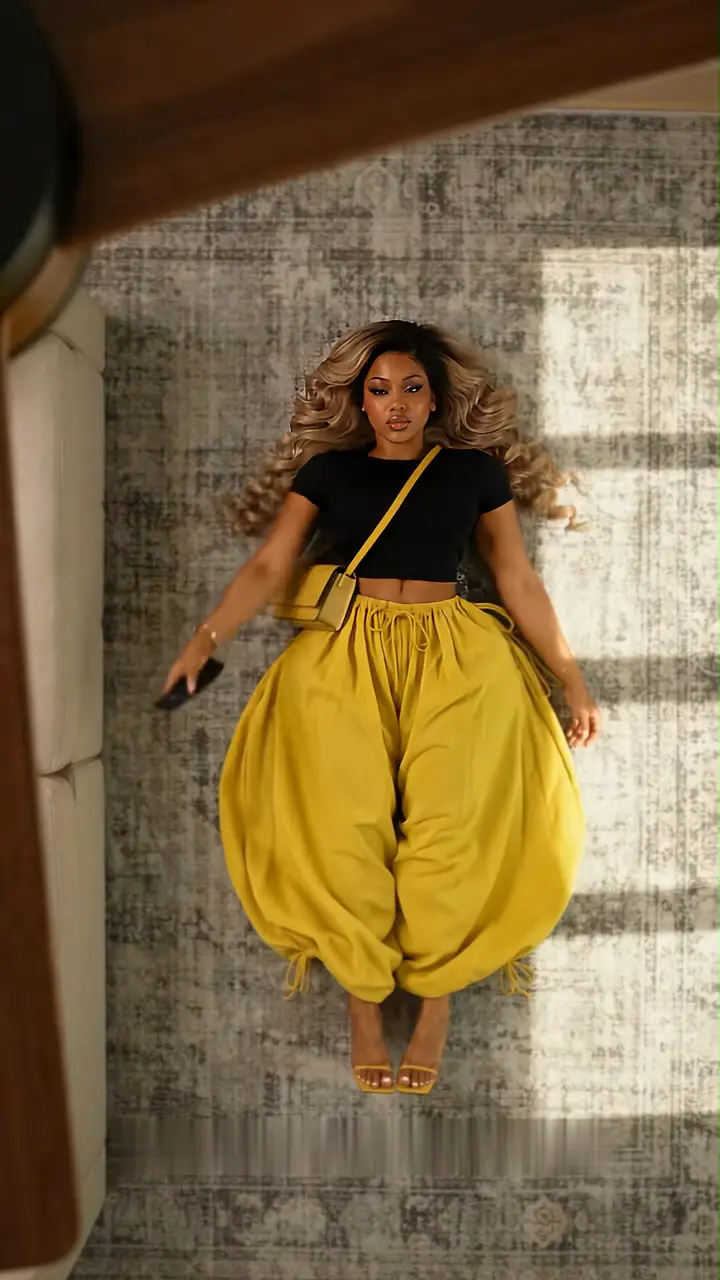
A top-down shot, a wooden fan, a new outfit at every blade. Where the ceiling fan trend comes from and how to put your own character under the fan.

 7s
7sMake it in eroq
Ceiling fan outfits
TikTok · ceiling fan trend
7 s clip · 1 character · 210 credits on Replace Pro
The ceiling fan trend is the outfit video everyone has been posting since late September 2026: a camera looking straight down at someone lying on the floor, a wooden ceiling fan turning between them and the lens, and a new outfit every time a blade sweeps across the frame. The pose stays and the person stays; only the look changes. This guide covers where the trend comes from, why it works, and how to make your own version in eroq with a character you made and the outfits you choose, using the ready-made Ceiling fan outfits template.
Where the ceiling fan trend comes from
The trend took off on TikTok in the last week of September 2026, and the how-to guides followed on September 28. TikTok's own search page for "fan transition trend ai" counts about 2.2 million posts. It is a format more than a single clip: the original viral example set the rules, and everyone else brought their own wardrobe.
It can be filmed for real, and some creators do: tape a phone to the ceiling above the fan, lie underneath in one outfit, then the next, and cut the clips together on the blades. That takes an afternoon and a pose you can repeat to the inch. The AI versions skip the ceiling mount and the costume changes.
The detail that sells it is the edge of the blade. The change follows it down the body, so for a split second the half it has already passed wears the new outfit while the rest still wears the old one.
Why it works so well as a trend
- One frame says it all. A fan above and a body on the floor below read in a single frame, sound off, at phone size.
- The transition is built in. Each blade pass is a wipe that hides a cut, so the changes look seamless without any editing.
- A lookbook in a few seconds. A few outfits at about two seconds each: a capsule wardrobe, a season of coats, a costume reveal, a new collection.
- The face holds it together. Everything changes except the person, and that contrast is the whole effect. If the face drifts between outfits, the illusion breaks.
How the trend versions are made
Most AI versions start from a single selfie dropped into a trend template. The engine animates that one photo through every outfit change, so the face is only as steady as one picture allows.
eroq takes the other road, the one Replace is built for: keep a finished shot and change one thing in it. The template starts from the original viral example, its first seven seconds: a woman lying on a rug beside a sofa, the fan turning above her, and two outfit changes, each landing exactly as a blade sweeps across the frame. Its burned-in captions are blurred out, and it has no sound. You swap her for your character in the same pose, and every change still lands on the sweep of a blade. The outfits can be yours too: name them in the instruction, in order, or let the engine pick new ones. Your character's face and hair carry through every look, which is the promise of Characters: the same person in every shot, whatever they wear.
Make it in eroq with the Ceiling fan outfits template
- Open the template. Click Use the template on the card at the top of this page, or open it directly. In the studio, it sits on the Replace tab of Video under Trending templates, and under Trending now on your studio home. The seven-second vertical clip loads from eroq: nothing to download, nothing to trim. No account yet? You sign up first and land on the same page.
- Cast your character. The composer shows one slot, for the lead. Pick a character and the instruction writes itself: the woman with long wavy blonde hair becomes your character, in the same pose. No character yet? Create one from a few photos and a description; it opens in a new tab, so the template stays loaded.
- Check the engine. The template runs on eroq Replace Pro, which reads your character's identity sheet, so the face really matches, at 30 credits per second of clip.
- Click Replace. The edit takes a few minutes and lands in Creations. The pose, the framing and the moment of each change come from the original; the outfits are the ones you named, or new ones.
- Post it vertical. The clip comes back silent and in 9:16, ready for TikTok, Reels or Shorts: add the music in the app when you post.
Getting a good result
- Give your character an identity sheet. Replace Pro casts from it; a character with photos and no sheet gets one made when you click Replace (10 credits). You can also make it on the character's Details tab, right under its photos, and read consistent characters in AI video for how a sheet holds a face.
- Name clear, non-revealing outfits. To choose the looks, list them in the instruction in the order they should appear. Distinct colors make every change read on a phone.
- Keep the end of the instruction. Its last two sentences put each outfit change on the sweep of the blade and keep the overhead framing, the rug, the fan, the sofa and the light. Edit the rest if you like: the text stays editable after the template writes it.
- Compare before you post. Drag the divider across the frame to compare the reference with your version. If a change lands off the blade, click Replace again.
Or write it from scratch in Video
The template keeps the original's room, pose and timing. To change those too, a different setting, more outfits, another angle, write the trend from scratch in Video: cast your character with @, list the outfits in the order they should appear, and keep them non-revealing, since the trend is about style. A prompt like this one, written for Lena, one of eroq's fictional characters, is a good start:
Locked overhead top-down shot of @Lena lying on their back on a vintage Persian rug, a large wooden ceiling fan spinning slowly in the near foreground. Each blade sweep wipes the frame and changes the outfit while the face, hair and pose stay identical: an oversized hoodie and jeans, a tailored emerald suit, a leather jacket, a cozy autumn knit. Warm afternoon light, no camera move
Swap @Lena for your character and the four outfits for yours. Pick an engine that reads reference pictures, so your character's look sheet rides with the prompt: the Seedance and Kling engines do, and ten seconds cost 150 credits on Seedance 2.0 Mini. The outfits follow your words, but the timing of each change is the engine's, so expect to run a take or two.
What it costs
| Engine | The whole clip | Notes |
|---|---|---|
| eroq Replace Pro | 210 credits | Add 10 credits once if your character still needs an identity sheet |
The price on the Replace button follows the length of the clip, and the trim bar can shorten it, though the changes need the full seven seconds. It runs on every plan, but the 40 free credits a new account starts with don't cover a render: the credits come from a pack or a plan. An edit that fails is refunded.
Who you can put under the fan
The viral versions star the people who post them, and the template starts from the original example: your character takes the place of the woman in it. On eroq you cast characters you made: an original character, yourself, or a friend who agreed to it. The usage policy asks for characters who are 18 or older and rules out real, identifiable people without their consent. The original clip belongs to its creator, so post your version the way the trend does: as a remix that credits the original.
Leave the songs of the viral examples out of your file: they are copyrighted, and a video that carries one can be muted or taken down. Pick a track from the app's licensed library when you post.
More trends, same idea
Ceiling fan outfits sits in the Trending now row of the studio home, next to the Bulin 47 freestyle and the Hotel Lobby template, which also start from the original. Every format is collected under Trends, and the guide to vertical clips covers formats, lengths and engines for TikTok and Reels.
FAQ
What is the AI ceiling fan trend?
A vertical outfit video shot from above: someone lies on the floor under a turning wooden ceiling fan, and every time a blade sweeps across the frame their outfit changes while the pose and the face stay the same.
What song is used in the ceiling fan trend?
Creators pick their own; one widely shared example plays Duran Duran's "Girls on Film". Those songs are copyrighted, so keep them out of your file: the template's clip comes back silent, and the app's licensed library has music to add when you post.
Can I do the ceiling fan trend without AI?
Yes: tape a phone to the ceiling above the fan, film the same shot in each outfit, and cut the clips together on the blades. The AI version skips the ceiling mount and the changes of clothes.
Can I choose the outfits?
Yes, in words. Name the outfits in the instruction, in the order they should appear, and keep them non-revealing; leave them out and the engine picks new ones. For a different setting or more outfits, write the trend from scratch in Video.
Will my character's face stay the same?
That is what eroq Replace Pro is for, and the template runs on it: it casts your character from their identity sheet and keeps the face all along the clip.
How much does the ceiling fan template cost?
The template runs on eroq Replace Pro, open on every plan: the whole seven-second clip costs 210 credits, plus 10 credits once if your character still needs an identity sheet. The Replace button shows the exact price before you click.
7sMake it in eroq
Ceiling fan outfits
TikTok · ceiling fan trend
7 s clip · 1 character · 210 credits on Replace Pro